A bear blog plugin to create visually stunning Now pages
Everybody and their aunt has a now page these days. Mostly to tell their readers what they're currently watching, reading, or listening to.
Don't get me wrong, I wanted to make one too. But I wanted to add some ✨flair to it. Maybe I could display book covers and album art instead of just listing down their names in plain text? Maybe something that looks like... this?
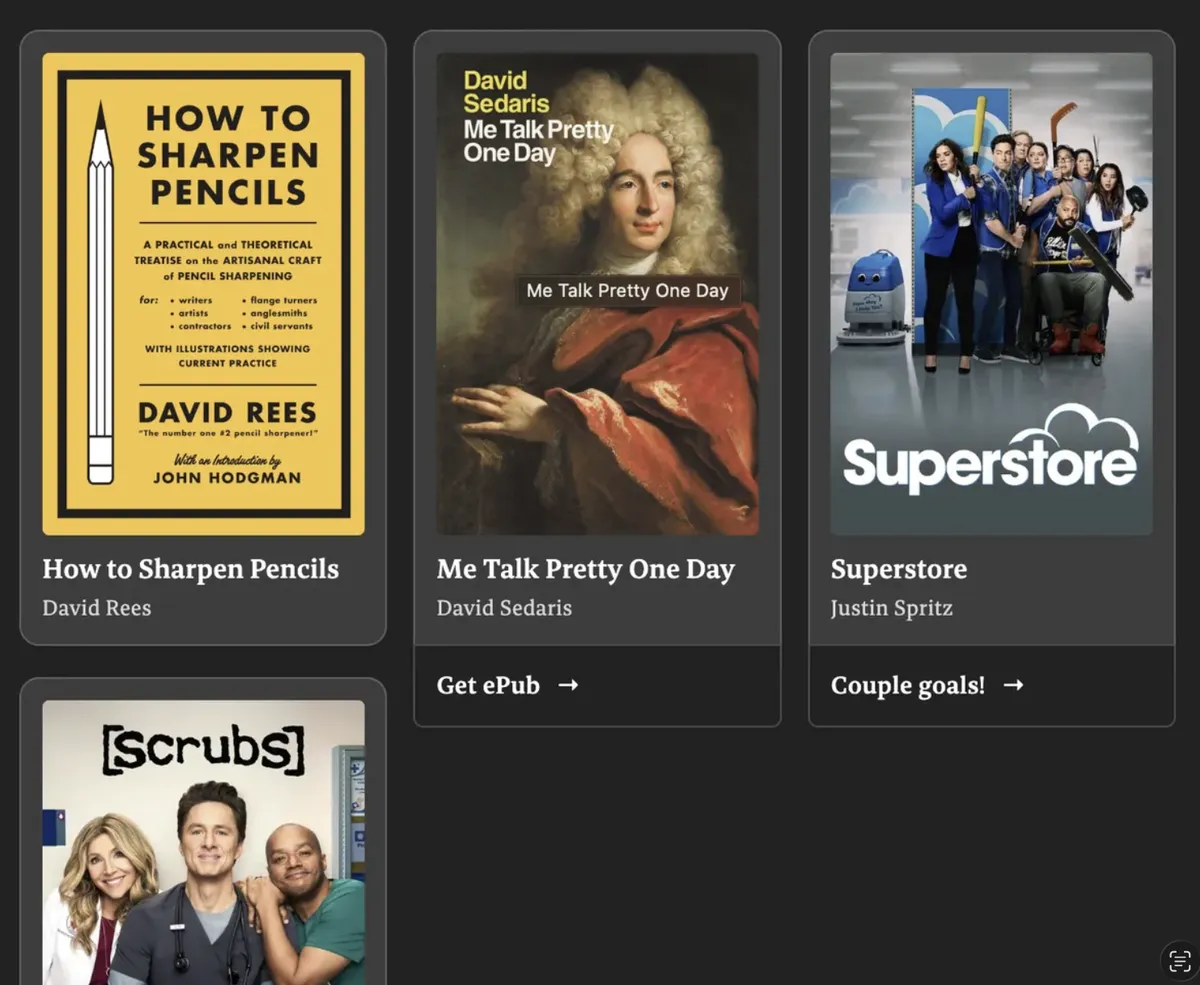
But how would I do it?
I couldn't possibly upload a dozen images every other week. There had to be a better way.
The research
Turns out, there was a better way.
I came across the excellent iTunes artwork fetcher project by Ben Dodson. I learnt we could automatically fetch book covers (and album art!) using the iTunes API.
It worked for movies and TV shows, too, although less reliably. Luckily, the Movie DB's API is free to access for personal, non-commercial use, and it works just as well.
So I took it up as a weekend hobby project to create a plugin. The job was simple: convert any markdown list into a visually stunning media shelf.
For example, if you input:
- 🔢
- [Book] How to Sharpen Pencils | David Rees | # | #
- [Book] Me Talk Pretty One Day | David Sedaris | <insert link here> | Get ePub
- [TV] Superstore | Justin Spritz | https://www.youtube.com/watch?v=cZPN2E7ZicI | Couple goals!
- [TV] Scrubs (2026) | Bill Lawrence
Your page will transform it into a visual media shelf like the one you saw above.
How to install it on your bear blog
It's pretty lightweight, but I doubt anyone will use something like this on more than one page. So I recommend plugging both the CSS and JS snippets into a single, standalone page. You need not inject them into your generic header / footer directive.
Add the code snippets
Paste the below snippet at the top of your page.
<head>
<style>
/* Paste full source from shelfish.css here if you want total independence */
<link rel="stylesheet" href="https://cdn.jsdelivr.net/gh/secret3rd/shelfish/shelfish.css">;
</style>
</head>

Start of body content

Your markdown list
Paste the below snippet at the bottom of your page.
Your markdown list

End of body content

<script src="https://cdn.jsdelivr.net/gh/secret3rd/shelfish/shelfish.js"></script>
Creating shelves
Anywhere in that page, you can create a media shelf by creating a markdown list starting with 🔢 as the first bullet.
For syntax example, scroll up or refer here for a detailed guide. .
Other useful links
For a live demo: My now page
For source code and detailed documentation: GitHub
What made me do this
I know the saying. Don't judge a book by its cover and all that. But some book covers are so fucking gorgeous. And we could all use a little colour in our lives. I feel similarly about album art.
Movie / TV show posters are mostly a mess, though. But there was an easy enough API implementation, so I figured why not.
Got some thoughts?
If you like what you see, consider joining my mailing list or buying me a coffee.